Free browser extension for LinkedIn and Facebook
See the posts you came for.
UnAlgorithm Feed quietly folds away ads, suggested posts and other things you didn’t ask for in your LinkedIn and Facebook feeds. No account, no setup. The rules run entirely in your browser.
Free and open source · by HeitechSoft, made in Canada
What is UnAlgorithm Feed?
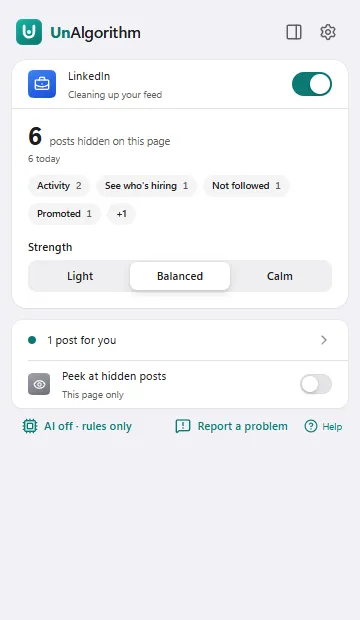
UnAlgorithm Feed is a free, open-source browser extension by HeitechSoft that hides algorithmic noise on LinkedIn and Facebook: ads, suggested posts, “liked this” activity, feed panels such as People You May Know, and posts from people you don’t follow. Each hidden post folds into a thin line you can open, with a Why? that explains the call.
How it works
It folds away what you didn’t choose
Feeds are ranked to keep you scrolling. UnAlgorithm reads the page you already have open, folds the noise into a thin line, and leaves the people you follow alone.
- AdsPosts marked Promoted or Sponsored.
- Suggested postsPosts the feed picked for you from accounts you never chose.
- Network activity“Jane likes this” and “commented on this”, instead of the post you came for.
- Feed panelsPeople You May Know, “see who’s hiring” and other carousels.
- Groups you haven’t joinedPosts pushed in from groups you’re not part of.
- People you don’t followOn LinkedIn in Balanced; on Facebook in Calm, for now.
Which HR task would you automate first if you had an AI assistant for a month?
Our team tried no-meeting Wednesdays for a quarter. Writing things down replaced most of the meetings we dropped.
Three things I tell every new grad on their first night shift.
Three strengths
How calm should your feed be?
Pick a starting point. Change it anytime from the toolbar, and the feed updates live.
Light
Just the clutter
Hides ads and feed panels like People You May Know. Everything else stays.
BalancedRecommended
What you didn’t ask for
Also hides suggested posts, activity from your network, groups you’re not in and people you don’t follow.
Calm
Only what matters
Shows only people, pages and groups you follow, without Reels or reshares.
Built to be trusted
You stay in charge of your feed
Always explains itself
Every hidden post has Why?: what was detected, with fixes like “Always show this person” and Undo.
For you
Pick a few interests and matching posts get a quiet highlight, with keywords or AI.
Fails open
If a site changes its layout and detection looks wrong, UnAlgorithm stops hiding and tells you.
Never silent
A hidden post leaves a thin line you can open. Nothing is deleted, and nothing is clicked for you.
Nothing leaves your browser unless you turn on AI.
The rules make no network requests. There’s no account and no tracking in the extension, and HeitechSoft never sees your feed. With AI on, only a post’s text and a few facts about it go to the AI you chose: never author names, profile links, comments or images.
Optional AI
Smarter filtering, wherever you want it to run
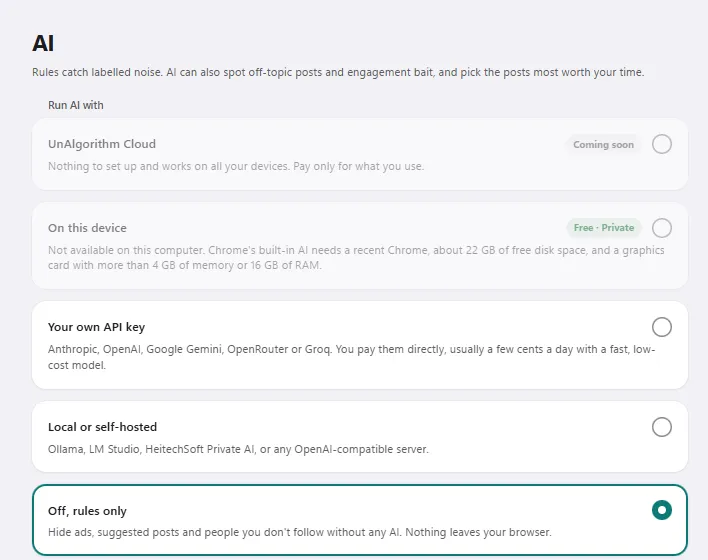
AI is off by default. Turn it on to also fold away engagement bait, rage bait and clickbait, and to find the posts that match your interests.
- Rules onlyFree · defaultNo AI at all. Nothing leaves your browser.
- On this deviceFree · privateChrome’s built-in AI, on computers that support it.
- Your own API keyPay your providerAnthropic, OpenAI, Google Gemini, OpenRouter or Groq. About a cent per 100 posts.
- Local or self-hostedFreeOllama, LM Studio or any OpenAI-compatible server you run.
Install
Get UnAlgorithm Feed for Chrome
UnAlgorithm Feed is in public preview and coming to the Chrome Web Store. Until then, install it from the latest release on GitHub. It takes about a minute.
Needs Chrome, or another Chromium-based browser, version 130 or newer, on a computer. LinkedIn and Facebook must be set to English for now.
- Download the
unalgorithm-…-chrome.zipfile from the latest release, and unzip it. - Open
chrome://extensionsand turn on Developer mode (top right). - Choose Load unpacked and select the unzipped folder.
- A one-minute setup opens in a new tab. Then open LinkedIn or Facebook and scroll.
UnAlgorithm Feed at a glance
- What it is: a browser extension that folds unwanted posts in your LinkedIn and Facebook feeds into thin lines you can open again. It never hides anything silently.
- Price: free. No account and no subscription.
- Works with: the LinkedIn home feed, and Facebook in preview, with the site set to English. Chrome or another Chromium-based browser, version 130 or newer, on a computer.
- Privacy: the rules run in your browser and make no network requests. Nothing leaves your computer unless you turn on AI, and then only a post’s text and a few facts about it go to the AI you chose. Never author names.
- Optional AI: Chrome’s built-in on-device AI, your own API key (Anthropic, OpenAI, Google Gemini, OpenRouter, Groq), or a local or self-hosted model (Ollama, LM Studio, any OpenAI-compatible server).
- Open source: AGPL-3.0-only, with the source on GitHub.
- Made by: HeitechSoft, in Ontario, Canada.
Questions
Is UnAlgorithm Feed free?
Yes. The extension is free and open source. The rules, Chrome's on-device AI, your own API key and local or self-hosted models will always be free. A future optional service, UnAlgorithm Cloud, will offer hosted AI and sync, paid with prepaid credits rather than a subscription.
Does it work on Facebook?
Yes, in preview. On Facebook, UnAlgorithm folds away Sponsored posts, feed panels, suggested posts, friend activity and posts from groups you're not in. Hiding people and pages you don't follow is limited to the Calm strength until it has been checked on live feeds. More about Facebook.
Does UnAlgorithm Feed collect my data?
No. The rules run in your browser and make no network requests, and HeitechSoft never receives your feed, your settings or your browsing. If you turn on AI, only what's needed to classify a post goes to the AI you chose: its text, with email addresses, phone numbers and mentions masked, and a few facts about it. Never author names, profile links, comments or images. Read the privacy policy.
How is it different from an ad blocker?
An ad blocker removes ads. UnAlgorithm Feed curates the whole feed: besides ads it folds away suggested posts, "liked this" activity, feed panels and posts from accounts you don't follow, and with AI turned on, engagement bait, rage bait and clickbait. It explains every post it hides, and it doesn't block network requests or touch other sites.